

We are here for you
Get a fast response to any question
Write to us
Call us at
Our vibrant offices:
Lithuania Office
28-201 Vilniaus Street, 3rd Fl., LT-01402, Vilnius, Lithuania
Romania Office
144 Gheorghe Titeica Street, 1st Fl., 020304, District 2, Bucharest, Romania
Contat us
Applying for Account
How do I open a Wallter corporate account?
Follow the link and apply for a new account. Here’s a short video about how to register for a Wallter account.
What kind of accounts does Wallter offer?
We provide corporate accounts tailored to business needs. Follow the link to explore more details about our accounts and the full fee schedule along with our range of services.
What supporting documents should I provide?
Ensure you have the following documents available: Registry Extract/Certificate of Incumbency and Memorandum and Articles of Association. Additional supporting documents will be required, depending on the type of account you wish to open and other parameters such as jurisdiction, incorporation date, and licensing requirements. We’ll guide you on the specific documents to submit based on the information provided during the onboarding process.
You can read more details in our blog posts:
- European Companies – Best Practices for European Companies Opening a Borderless Bank Account
- Non-European Companies – A Guide for Non-European Companies Opening a Borderless Bank Account
How long does it take to open an account?
Once you fulfill all the requested requirements and provide the necessary documents, it takes 1 to 5 working days for the account to be approved.
How do you verify my identity?
Wallter offers remote identification methods, so the individual identification and collection of the company’s KYC (Know Your Customer) documentation may be done remotely. See here How to correctly complete Wallter’s identity verification process.
In this case, we only require copies of your ID document. Corporate documents are required to be submitted during the application process. Alternatively, all copies of documents should be originally certified by a notary (in some cases by Apostille), and sent directly to: [email protected].
How much does it cost to open a Wallter account?
Follow the link to see the fee schedule.
What are the prohibited businesses and jurisdictions?
The full list of prohibited businesses and jurisdictions can be found here.
Corporate Cards
How can I apply for a corporate card?
You can order a prepaid business card by emailing us at [email protected]. Currently, the cards are available only for existing clients.
How do I activate my corporate card?
Contact your account manager to activate your card.
How can I receive my PIN code?
Please login to your cardholder portal at https://login.crunchpayments.com, go to account settings – activation code.
How can I check my balance?
Log in to your cardholder portal at https://login.crunchpayments.com/ to access your statement.
Where and how can I use my card?
You can make purchases using your card wherever Mastercard is accepted, both online and at any Point-Of-Sale (POS) terminal. Additionally, you can withdraw cash from any ATM that accepts Mastercard.
How do I load my corporate card?
You can easily tup-up your prepaid card from your Wallter account.
What should I do in case my card is lost or stolen?
If your card is lost or stolen, please report it to your account manager at [email protected] immediately, and proceed to block your card at https://login.crunchpayments.com/.
Private Data Protection
Does Wallter disclose my personal information to any partner?
We do not sell, lease or rent your personal data in any way. We may disclose your personal information to companies within the Wallter Group, our merchants, fraud and credit reference agencies we use for onboarding in accordance with our Privacy Policy. This may be necessary in order to, among other things, fulfill your request, process your payment details, provide support services and monitor fraudulent activities. When mandatory by law, we may be obliged to disclose your personal data to certain authorities and law enforcement agencies. Please note, we may share your personal information with third parties only in ways that are described in our Privacy Policy.
Does Wallter’s website collect information about me using cookies?
On our website, we use only the necessary cookies that are crucial for the basic functions of the website. These cookies do not store any personal identifiable data. For more information on cookies, please refer to our Privacy Policy.
Online Managment
How can I change my email or phone number?
To change these details you need to write an email to [email protected].
How can I grant permission for another person to manage the account?
Send your request to [email protected] and our support team will guide you.
How do I order a monthly statement subscription?
A monthly statement is issued automatically. You may find it here: Login >> Report: Statement Report.
How do I exchange currency?
Go to Between My Accounts -> When choosing two of your accounts with different currencies, the platform will automatically offer a currency conversion. You can select whether you wish to sell or buy currencies, specify the amount, and choose the ‘From’ and ‘To’ accounts for the transfer.
What currencies are supported for sending and receiving funds?
Currently, we support the following currencies: EUR, USD, GBP, and ILS.
Please contact us for additional currencies.
What details should I provide in order to receive funds to my Wallter account?
To receive funds in your account, you must utilize all your bank details. You can find them in the reference letter you received during the onboarding process. Further details can be found in our User Manual.
Can I receive funds to my Wallter account?
Yes, you can receive SEPA and SWIFT payments.
Can I send funds from my Wallter account?
Yes, you can send SEPA and SWIFT payments using the Transfer Money function.
What should I do if I forget my Login or Password?
If you have forgotten your password and need to reset it, click ‘Forgot my password‘ on the Login page and follow the necessary steps.
How do I make mass payments?
Mass payment allows you to make multiple SEPA transfers simultaneously easily and fast!
Instead of creating one transfer for each beneficiary separately, you can upload all the beneficiary data into a .xlsx template and generate the transactions with one click.
Here is a step-by-step guide to making bulk payments:
- Access the Mass Payment tab
- Select the source account
- Upload the completed mass payment template -> Click Execute.
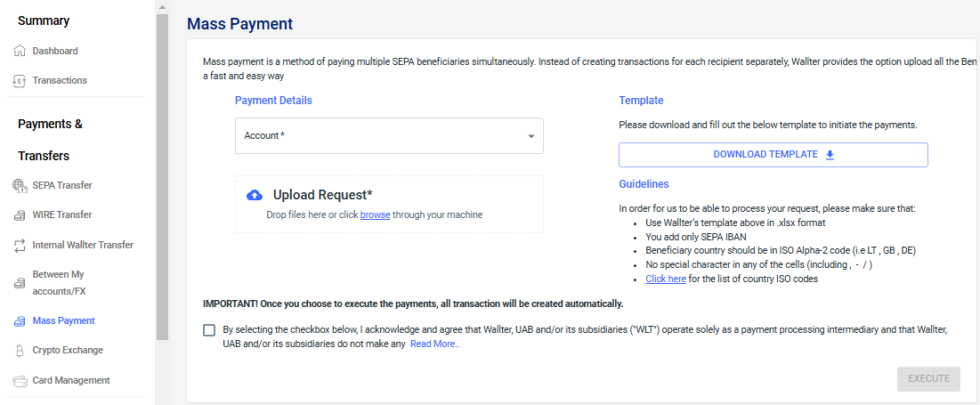
The transaction list is sent for processing and displayed in recent mass payments as Processing.
Once completed, your transactions will be visible in your Dashboard.
Mass Payment Template Guidelines
To ensure your mass payments are processed correctly, please ensure the following:
- Don’t change the format and the columns in the .xlsx template;
- Use only SEPA IBAN accounts;
- The beneficiary country only ISO Alpha-2 code (i.e LT , GB , DE);
- No special character in any of the cells (including , – / ).
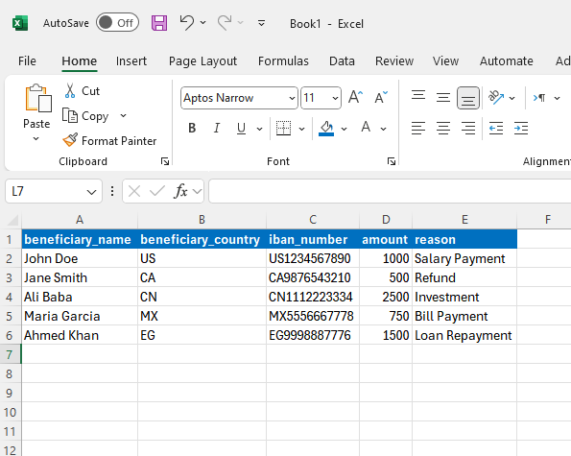
Video Tutorial: How To Use Mass Payment
Company Licenses & Regulations
How safe is my money at Wallter?
Wallter is regulated by the Central Bank of Lithuania and follows the PSD2.
Is Wallter a licensed institution?
Yes, follow the link to see Wallter’s license.